Apple Container Machine: A Persistent Linux VM Inside macOS
A year ago, at WWDC 2025, Apple open-sourced container — a Swift-based CLI for running Linux containers on macOS, built on the Containerization framework and Apple's Virtualization.framework. The Apple container model is genuinely different from Docker Desktop's single shared Linux VM: every container gets its own lightweight VM. It matured out of preview and shipped its first stable 1.0.0 release on June 9, 2026.
Then, at WWDC 2026, Apple added something new on top of it: container machine. Where a regular container is ephemeral — booted fresh from an image every time you run it, discarded when it stops — a machine is persistent and stateful. Stop it, come back next week, your changes are still there. And unlike plain container run, a machine automatically mirrors your Mac's current directory and username into the Linux environment with zero configuration.
That last part is the interesting bit, and it's worth understanding both how well it actually works and how it works under the hood — because the two turn out to be different questions.
Getting started with Apple container machine
$ container machine create alpine:3.22 --name demo-machine --set-default
[1/3] Fetching image
[2/3] Unpacking image
demo-machine
$ pwd
/Users/messutied/Developer/machine-test
$ container machine run pwd
/Users/messutied/Developer/machine-test
$ container machine run cat test.txt | head -1
> Test text file
Same path, same files, no -v or --mount flag anywhere. That's not a coincidence of naming — it's a specific, deliberate mount trick.
Two different boot paths
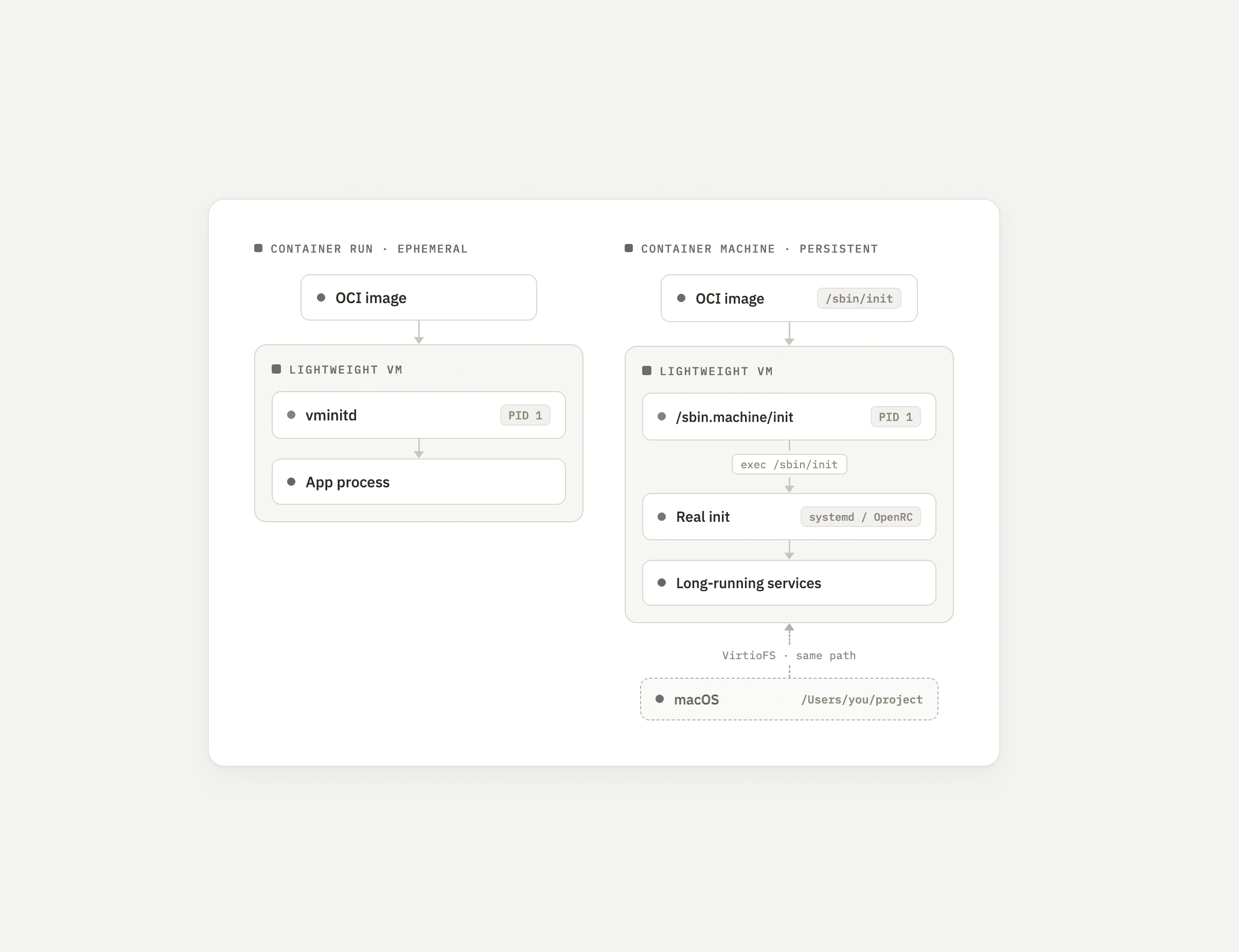
Before getting into how the mirroring works, it's worth seeing why a machine and a regular container behave so differently at boot — they don't share the same startup path at all:
A regular container run always boots into Apple's own minimal Swift init, vminitd, no matter what image you give it. A container machine boots a small wrapper script that hands off to the image's own real init system — which is also why it needs one to exist in the first place.
How the mirroring actually works
The mechanism is VirtioFS, the same shared-filesystem virtio device macOS's own Virtualization.framework exposes for other VM tooling. When you create a machine, container builds a mount configuration where the source path (on macOS) and the destination path (inside the Linux guest) are the literal same string — your Mac's home directory, verbatim. That's the entire trick behind pwd matching on both sides: it isn't path translation or a clever symlink, it's a virtiofs mount pinned to an identical absolute path on both ends.
This is configurable via a --home-mount flag at creation time (rw, ro, or none), also adjustable after the fact with container machine set -n <name> home-mount=<value> (takes effect on the next restart). Setting it to none disables host filesystem access into the machine entirely, if you want an isolated environment instead.
Username mirroring works differently — not a mount trick, but genuine account provisioning. At create time, the CLI reads your Mac's username and UID/GID and passes them into the VM's boot sequence as environment variables. On first boot, a setup script inside the guest writes real entries into /etc/passwd, /etc/group, and /etc/shadow for that user — deliberately hand-rolled rather than calling useradd/adduser, since those tools differ across distros and this needs to work on anything with /sbin/init. It also copies a default profile into the new home directory and grants the user passwordless sudo. This only runs once, gated by a check for whether that user already exists.
A different init system than regular containers
Here's a detail that doesn't show up anywhere in Apple's marketing material: container machine doesn't boot the same way plain container run does. Every ephemeral container — regardless of image — boots into Apple's own minimal Swift-based init process, vminitd, as PID 1. A machine does not. Its PID 1 is a small wrapper script that sets the hostname, runs the first-boot user setup described above, and then execs the image's own /sbin/init, handing control to whatever real init system that image ships — systemd, OpenRC, whatever it is.
That single design choice explains a failure we hit directly: creating a machine from ubuntu:24.04 or debian:trixie failed outright.
$ container machine logs nginx-demo
/sbin.machine/init: 74: exec: /sbin/init: not found
Official Ubuntu and Debian Docker Hub images are deliberately stripped down for running single processes in containers — they don't ship an init system at /sbin/init at all. Alpine's official image does, which is why it booted fine. This is a real constraint specific to container machine, not a limitation of container run (which never needs a real init, since it always uses vminitd). If you want to build a Debian- or Ubuntu-based machine image, you need a Dockerfile that explicitly installs systemd (or another init) first.
The mirroring is real, but flaky right after creation
Testing the username mirroring produced inconsistent results. In one test session, pwd returned correctly but whoami threw "Operation not supported by device." Recreating the machine and testing again flipped the failure to the opposite command. A handful of retries later, both worked reliably:
$ container machine run whoami
messutied
$ container machine run pwd
/Users/messutied/Developer/machine-test
This lines up with open issues on the project. The first-boot user-setup script only runs once, gated by a check for the user already existing — a plausible race between the VM finishing boot and the very first run invocation landing before that check resolves cleanly, though that specific causal link isn't something Apple has documented as a known bug. What is filed and confirmed: the project's own integration tests assert the guest home directory should be /home/<username>, while the actual virtiofs mount lands at the raw macOS path (e.g. /Users/<username>) — a documented internal inconsistency between the docs and the test suite. There's also a separate, confirmed bug where passwordless sudo silently fails to apply if your macOS username contains a period, because sudo's config-directory mechanism skips filenames with dots in them.
None of this means the feature doesn't work — it does, consistently, after the first boot settles. It means "automatic" currently comes with an asterisk.
Is Apple container machine just WSL2 for Mac?
A persistent Linux environment, with bidirectional file sharing configured automatically, that feels like a native extension of the host OS — that's the exact idea Windows has shipped for years as WSL2. Apple isn't the first to bring this idea to macOS either: Lima has auto-mounted a user's home directory into a Linux VM for years, and Colima (built on Lima) inherited that behavior. Here's how the specifics actually compare:
| Docker Desktop | Lima | Colima | WSL2 | container machine | |
|---|---|---|---|---|---|
| Persistent Linux env with a shell | No (VM is internal plumbing) | Yes | Yes | Yes | Yes |
| Auto host directory sharing | N/A | Yes (home dir, read-only default) | Yes (home dir, read-write default) | Yes | Yes (home dir, read-write default) |
| Sharing mechanism | VirtioFS (volumes) | 9p or VirtioFS, depending on driver | sshfs by default | 9P protocol (\\wsl$) | VirtioFS, identical source/destination path |
| Auto host username mapping | N/A | Yes | Yes (inherited from Lima) | No — manual first-run setup | Yes, but unreliable on first boot |
| First-party / official | Yes (Docker Inc.) | No (open-source project) | No (open-source project) | Yes (Microsoft) | Yes (Apple) |
| Reuses standard container image format as the environment's base | No | No | No | No | Yes — any OCI image with /sbin/init |
The distinguishing feature Apple actually adds to this list isn't the mirroring itself — Lima had that first — it's that a container machine's starting point is an ordinary OCI container image, the same format the rest of the tool already uses. Everyone else in that table needs a purpose-built VM disk image or cloud-init-style setup instead.
Is Apple container machine a Homebrew replacement?
For developers targeting Linux servers, partially. Homebrew's own maintainers have confirmed (Homebrew Discussions #2631) that macOS bottles are built with clang, while Linux bottles are built with gcc — not identical binaries to whatever actually runs in production. A persistent Linux VM sidesteps that gap entirely, for the subset of tools where it matters. It doesn't replace Homebrew generally — GUI apps and macOS-native utilities still need it — but for anything where "does this behave exactly like it will on the server" matters, running the real Linux build is strictly better than a cross-compiled approximation.
Testing this with nginx wasn't friction-free either, which is instructive on its own. The first attempt used ubuntu:24.04 as the machine's base image — it hit exactly the /sbin/init failure described above. Switching to Alpine worked, but then apk add nginx failed with a permission error, because commands run as your mirrored non-root user by default:
$ container machine run apk add --no-cache nginx
ERROR: Unable to lock database: Permission denied
$ container machine run --root apk add --no-cache nginx
(2/2) Installing nginx (1.28.3-r4)
OK: 10 MiB in 18 packages
$ container machine run --root nginx
Once nginx was actually running, hitting it from macOS directly confirmed it was serving real traffic — no port mapping required, since the machine has its own network address just like a regular container:
$ curl -sI http://192.168.64.18/
HTTP/1.1 404 Not Found
Server: nginx
That's a genuine Linux nginx binary, not a Homebrew macOS build. The 404 just means the default page wasn't where expected — the Server: nginx header is what confirms it's real and running.
The bigger picture
Apple container machine is a genuinely new capability layered on top of the container CLI's existing architecture, not a rebrand of something that already existed — the closest prior art (Lima) is a smaller open-source project, not an OS vendor's own tooling, and Docker has nothing comparable at all. The VirtioFS same-path mount trick and the real-init handoff are clever, deliberate engineering choices, not accidents. But it's also clearly a version-1.0-of-a-feature: the username mirroring has a documented race condition, the home-directory path is inconsistent between the docs and the test suite, and not every container image can serve as a machine base without modification.
If you're on Apple Silicon and want a genuine, persistent Linux environment that shares files with your Mac by default, Apple container machine is worth trying now. Just budget time for the rough edges, and don't assume the WWDC demo's smoothness is guaranteed on your first attempt.
Sources
- apple/container — main repository
- apple/containerization — underlying Swift framework
- docs/container-machine.md
- WWDC 2026, "Discover Container Machines"
- WWDC 2025, "Meet Containerization"
- PR #1662 — Add
container machine - Issue #1678 — home directory path inconsistency
- Issue #1713 — sudoers bug with dotted usernames
Secondary sources for the comparison table and the Homebrew argument are linked inline where used, above.

Eduardo Messuti
Founder and CTO
Eduardo is a software engineer and entrepreneur with a passion for building digital products. He has been working in the tech industry for over 10 years and has experience in a wide range of technologies and industries.
See full bio


Getting started
Ready to streamline incident communication?
Give StatusPal status pages a test drive.
The free 14-day trial requires no credit card and includes all features.